What's New: Early November 2026

Our last post was on October 8th. The three and a half weeks since have been the busiest period FairGame has had: sports that are not played in teams at all, a registration flow that can take a veterans' weekend with a dinner on the Saturday, and a scheduler you can write to.
This post covers five of those changes: taekwondo, judo and karate as sports with their own weight classes, weigh-in and mats; registration with an entry fee per category, per-person extras and eligibility rules; a scheduling brief the AI plans around; a format per category, with new choices for Swiss pools and re-seeding ladders; and the FairGame app update that ships today. As always a large share of the work was invisible, mostly moving the rules that decide standings, brackets and champions onto the server so every screen shows the same answer, and we have left it out.
Taekwondo, judo and karate, with the federation's weight classes
FairGame has run football, handball and the other team sports. Combat sports are built differently: the entrant is one athlete, divisions are weight classes with an age group and a gender, a bracket can be a repechage, and the morning starts at the scales. All of that is now in the product.
The setup wizard offers Taekwondo, Judo and Karate in its sport list, and from there on the screens speak the sport's language: athletes rather than teams, bouts rather than matches, mats rather than pitches, in the admin app and on the public site alike. Each athlete is entered with a date of birth, a gender and a declared weight, by hand or from the Excel and Google Sheet importers.
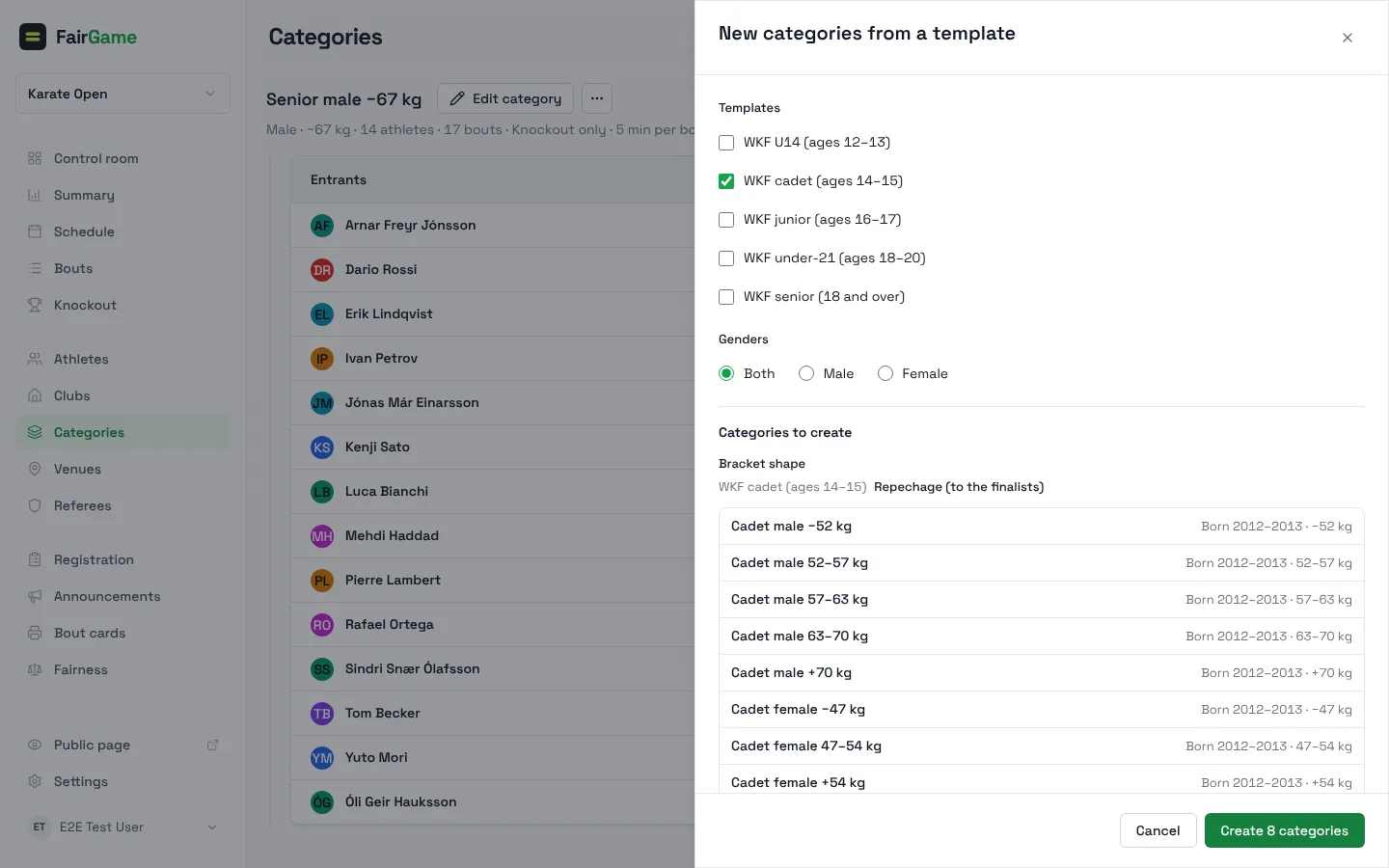
New from template on the Categories page creates a federation's standard divisions in one go: World Taekwondo's cadet, junior and senior kyorugi classes, the IJF's cadet, junior and senior classes, and WKF kumite from U14 to senior, male and female. You tick the templates and the genders and see every class the dialog would create, with the birth years for the season and the weight limits, before you create them. The classes come with the bracket shape the federation uses, and a class the tournament already has is skipped and named.
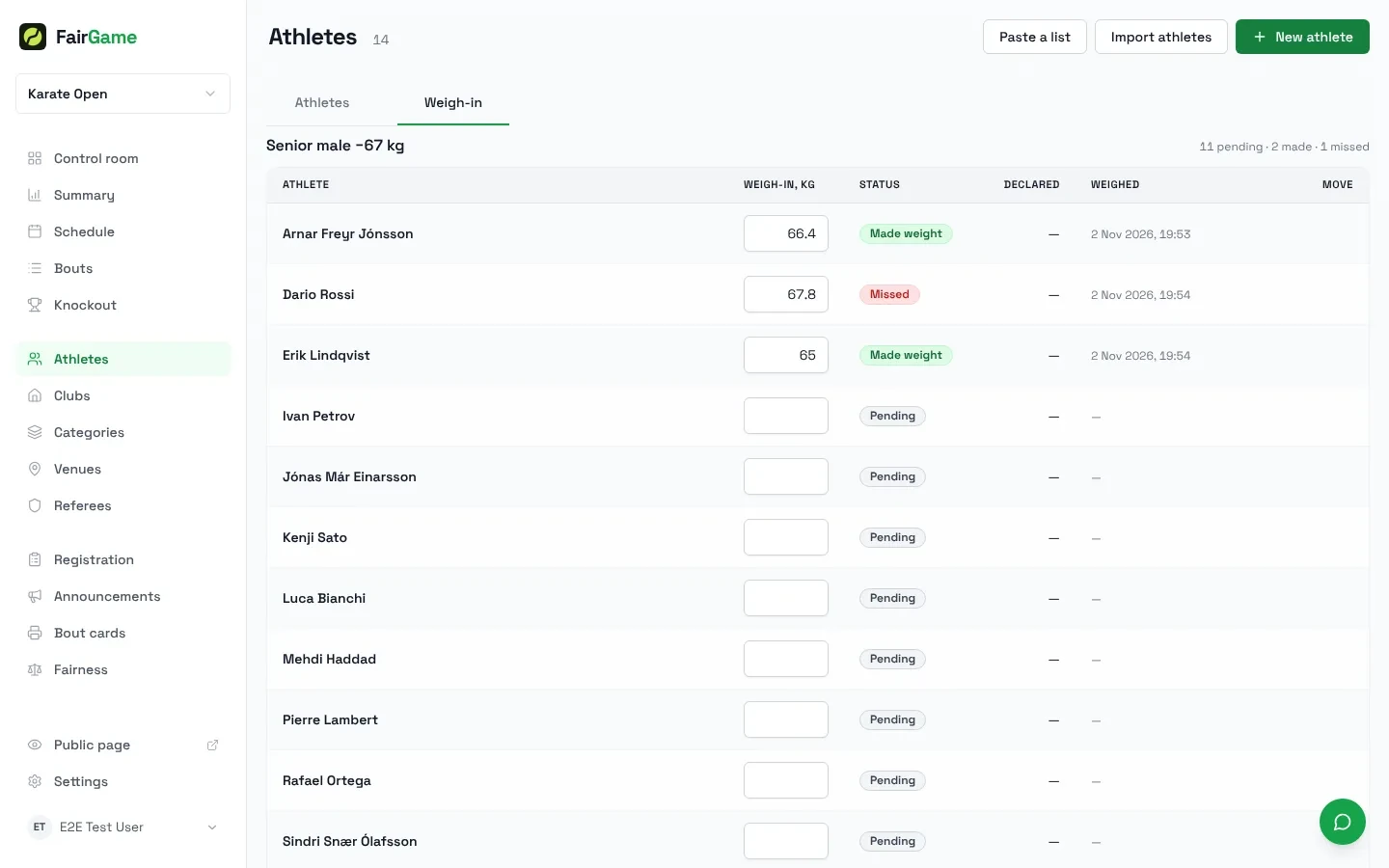
Weigh-in is a tab under Athletes while any division weighs in. One table per division lists every athlete's declared weight, the weight recorded at the scales, when it was recorded and the result, pending, made weight or missed, with the division's tally in the corner. The weight is typed straight into the row, and an athlete who missed can be moved to a higher class from the same table. The same age, gender and weight rules run when an athlete is assigned to a division, so an athlete who does not fit is flagged, and an organizer who wants to let it stand does so with Approve anyway.
Two bracket shapes join the knockout choices: judo's Repechage, where the athletes beaten by the eventual semi-finalists fight on for bronze, and WKF karate's Repechage (to the finalists), where only those beaten by the two finalists do. Both end in two bronze medal contests, so a podium has two bronze medallists, and the public Bracket tab draws the repechage lanes beside the main tree, with each undecided bout naming the semi-final it waits on.
The referee's tools followed. A referee with a bout's scoring link scores it in the sport's increments, one, two or three points in karate, and records sanctions from the same screen: a chukoku, keikoku or hansoku in karate, a shido in judo, a card in football, picked from the side's roster where the sport cards players. The server decides when a sanction ends the bout, and the scorer closes it and says why.
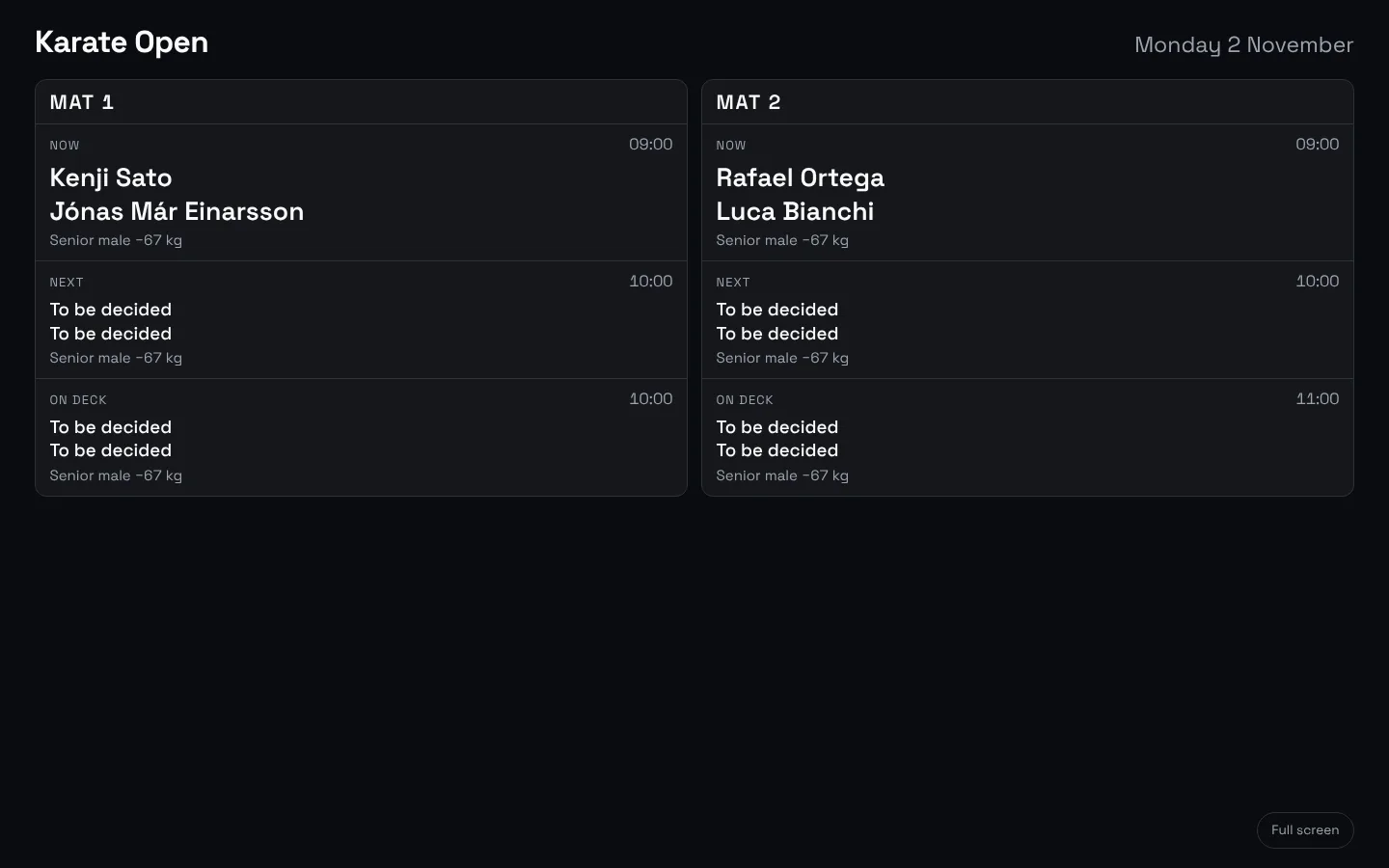
The Control room has a Mat board, or a Pitch board in a team sport: one column per mat with the bout Now, Next and On deck. Open the hall screen puts the same board on the television in the hall, beside the match clock from September, so the athletes warming up read their mat and their turn off the wall.
Registration for an event where every category costs something different
A veterans' football weekend sent us a long list. The team pays once, but Karlar 60+ costs less than Karlar 40+, every player must be old enough for the division, a squad may not exceed twelve, and each player, or their partner, buys a dinner ticket for the Saturday. Registration could do none of that in September. It can now.
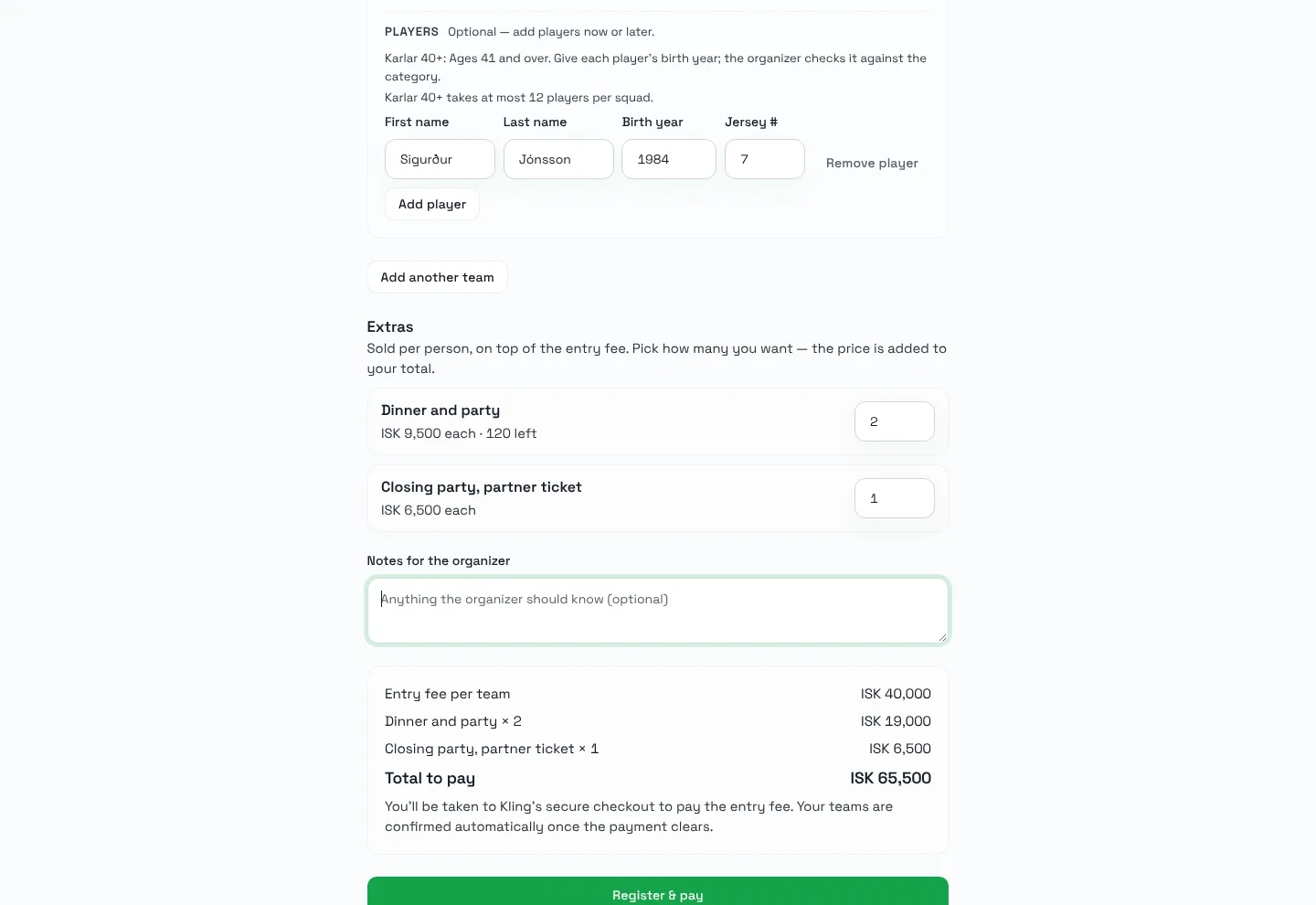
- An entry fee per category. Edit category has an Entry fee in ISK field; leave it empty to charge the tournament's fee, enter 0 to make the category free. The captain's form names each category's fee in the category picker and reads Entry fee per team: from ISK 40,000 at the top.
- Extras sold per person. The Extras list on the Registration page takes a name, a price and, if you set one, a limit. Captains pick how many when they register, the form shows what is left, and anyone joining through the team's link can buy their own. The payments summary counts what each extra sold and what is still awaiting payment, and every registration lists who bought what, so the caterer can count heads from the same page.
- Birth year and squad size. When a category admits players by birth year, the sign-up form asks for every player's Birth year and says who the division is for, and Players per squad, at most on the category caps the roster. The form refuses a squad over the cap or a player without a year, the server refuses the same, and the organizer's review marks a player who is not eligible for the division by name. Approve anyway is there for the organizer who knows better.
- Every price is the server's. The quote at the foot of the form lists the entry fee, each extra with its quantity and the total, line by line, and checkout charges exactly that. What the captain sees is what the Registration page later shows as collected.
One smaller fix from the same list: a team now has to pick a category when the tournament has any, instead of landing uncategorised for you to sort, and a tournament with one category starts every team in it.
Tell the scheduler what you want, in plain words
Organizers who wanted a schedule shaped to their event were taking the fixture list to ChatGPT and typing the result into the Organize board by hand. The Auto-schedule dialog now has a box for that: What should the schedule look like? Write a brief, the youngest categories play in the morning and are done by 14:00, both finals go on Pitch 1, and the button reads Schedule with AI.
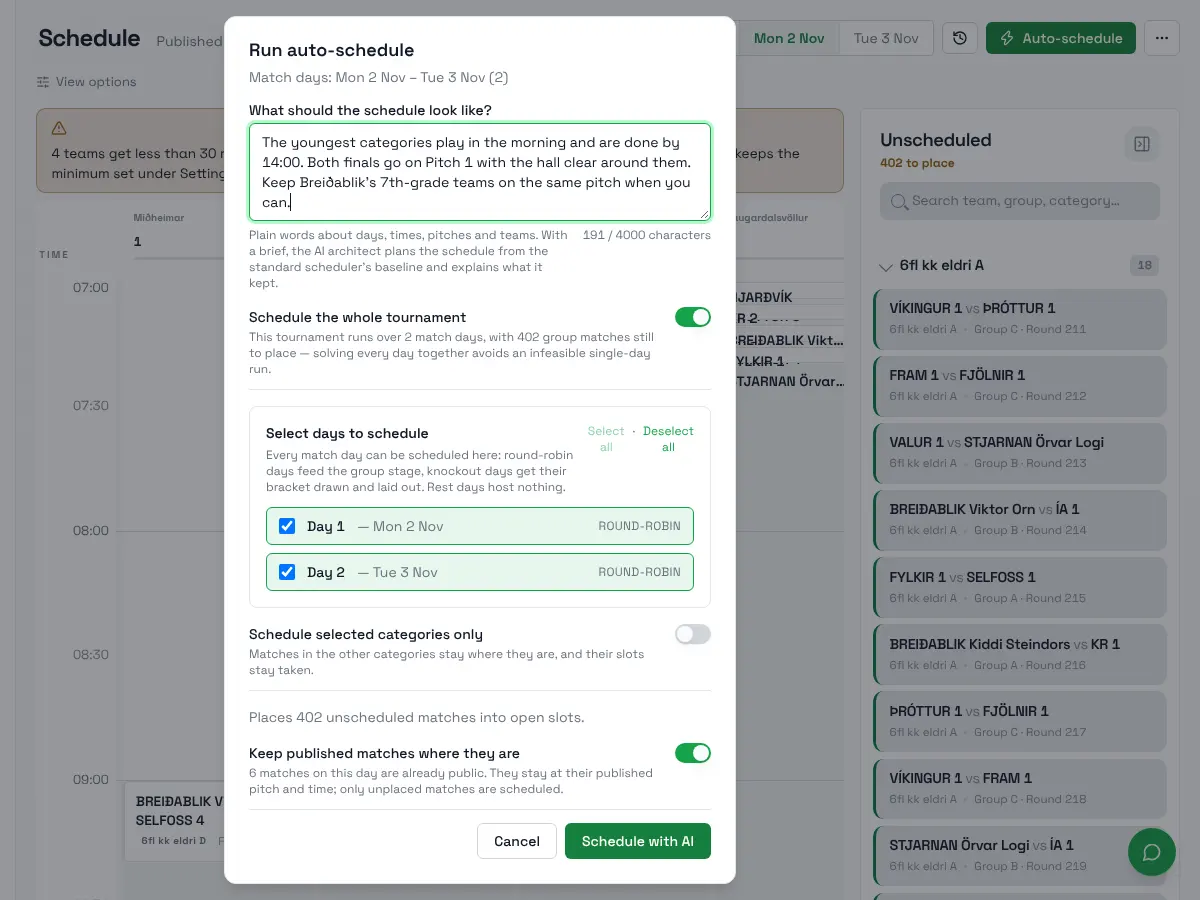
With a brief, the run becomes a background job: the standard scheduler places the matches first, then the AI architect works from that baseline and your brief, and every schedule it proposes is checked against FairGame's own rules, rest, pitch availability, locked kickoffs, before anything is kept. The results dialog then goes through the brief sentence by sentence, under Kept and Kept in part, and says what it did and what stood in the way. If the architect runs out of time or produces nothing better, you keep the standard schedule and are told why. The brief is saved with the tournament as a Scheduling brief card under Settings → Schedule & format and pre-fills the next run. Without a brief, Auto-schedule runs exactly as it always has.
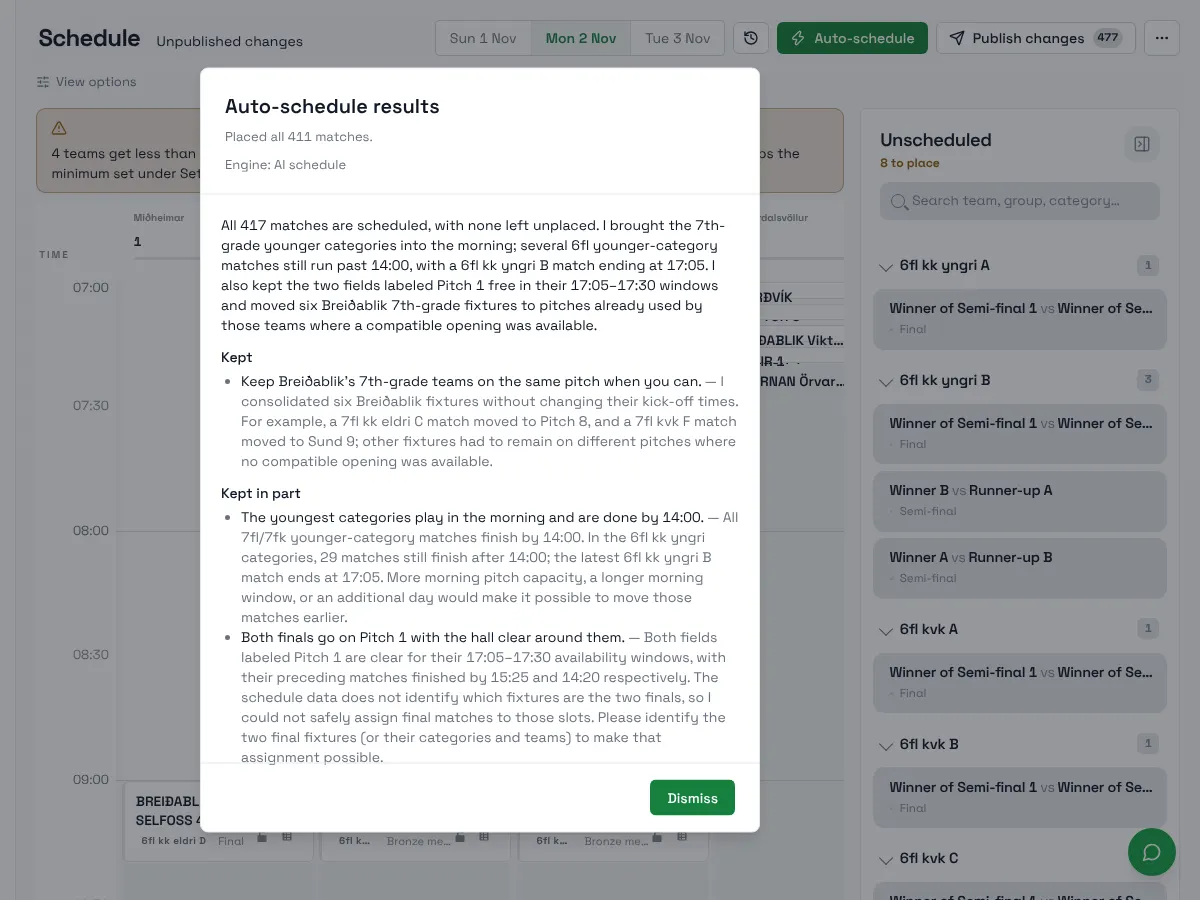
Two things went away with this. The advanced scheduler beta is retired; the rules only it enforced are now applied by the architect through the same checks. And the Pitch use choice between Spread and Compact is gone from the dialog, because it asked you to pick between two strategies you had no way to judge. Every run lays the day out the way Spread did, and an organizer who wants waits closer to the minimum rest says so in the brief.
The same idea reaches outside the app. FairGame is now an MCP server, which means the AI assistant you already use, Claude, ChatGPT or Claude Code, can connect to your organization and work on your tournaments from its own chat: which matches are still unplayed on Saturday?, add these six teams to the U12 category, run the scheduler. It signs in with your FairGame account, you choose read or write access, your client confirms every change, and the things that cannot be undone stay in the admin app. Use FairGame from Claude or ChatGPT has the steps.
One format per category, and more ways to run a Swiss pool or a ladder
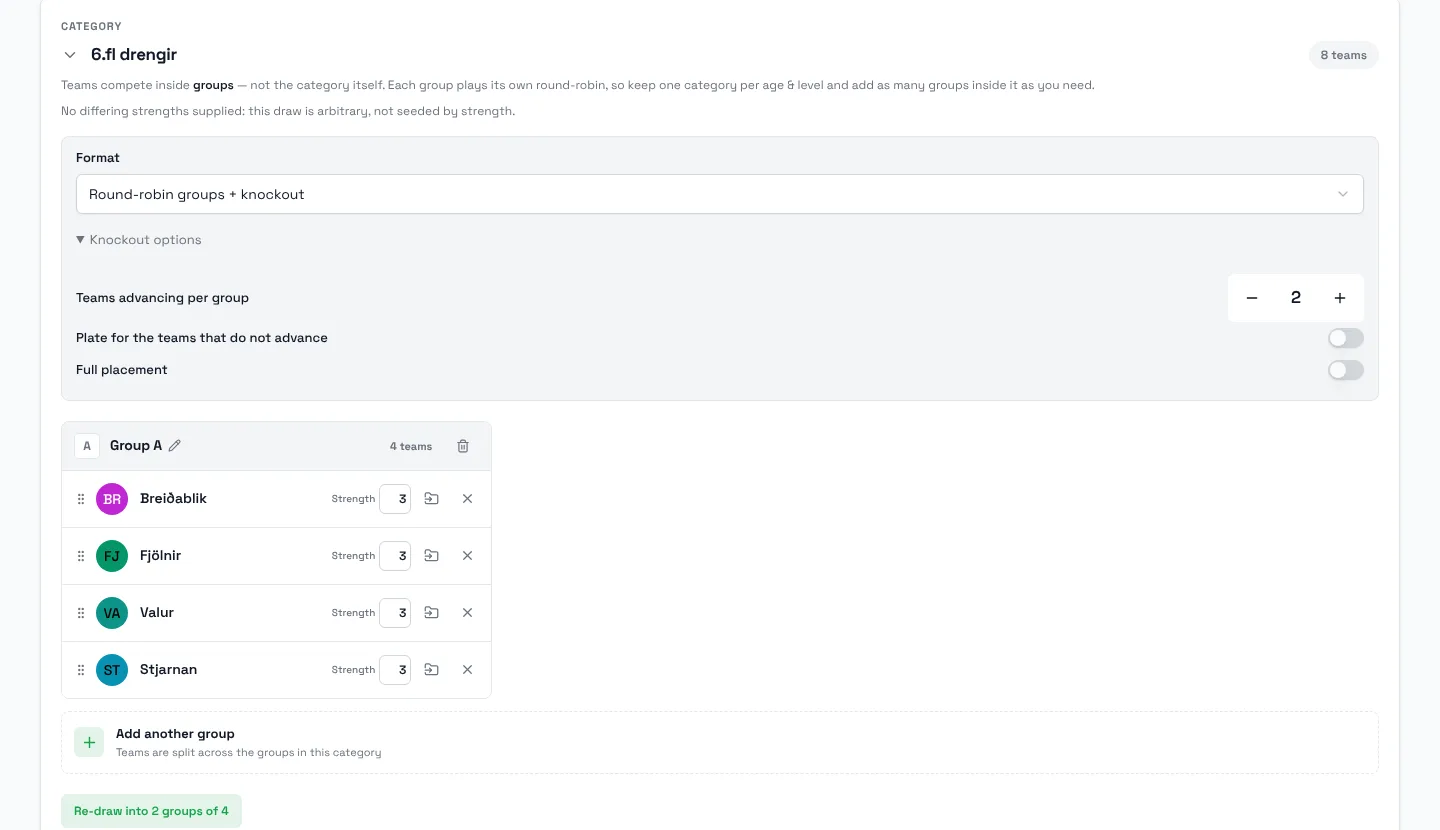
The setup wizard chose one format for the whole tournament, so a girls' field that suited a Swiss pool and a boys' field that wanted groups and a knockout could not share one draft. Each category card on the Teams board now has a Format control: the tournament's format, or round-robin groups + knockout, round robin, knockout, Swiss pool or Swiss pool + knockout, each with its own options, teams advancing per group, plate and full placement for a knockout, rounds, pairing and rematches for a Swiss pool. The Review step lists each category with the format it will get, and Finish builds every category as you set it.
Swiss pools gained two choices. Opponents, on the Swiss card, draws a pre-drawn pool either by Similar strength, as before, or Balanced across strength bands, UEFA pots, so every team meets opponents from each band, and the finish notes tell you how the draw came out, including when the strengths you registered left nothing to balance on. Under Settings → Schedule & format → Tiebreakers, Opponents' points first ranks a Swiss pool the way chess does, points first and then the points the opponents earned; the setting appears when the tournament plays Swiss pools, and the rung can also be placed in a custom order.
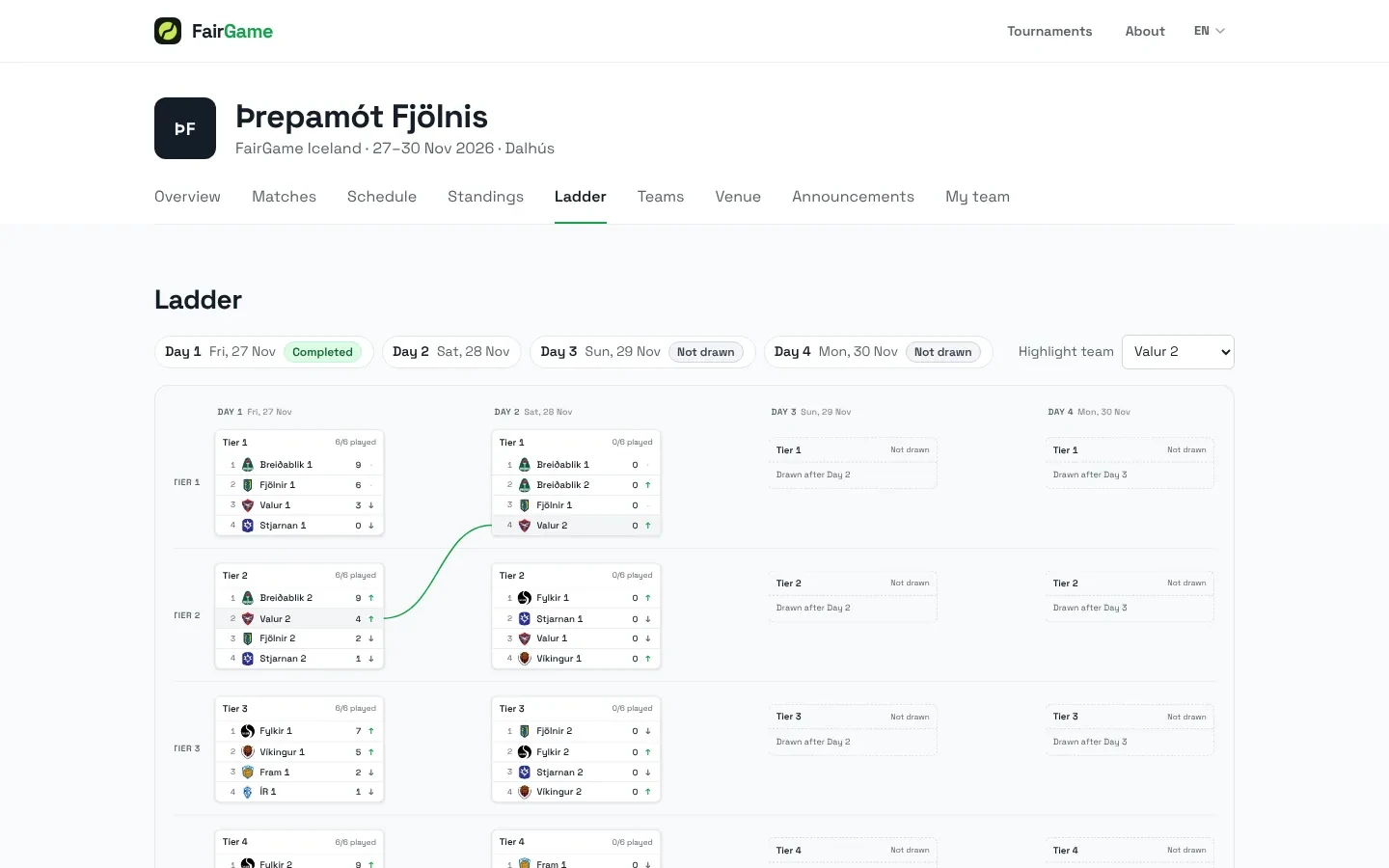
For the re-seeding ladder, the format where groups re-form each day as teams climb and fall, the public site gained a Ladder tab that shows the whole tournament at once: days across, tiers down, each table with its points and an arrow for every team promoted or relegated, and the days still to come marked Drawn after Day 2. Pick a team under Highlight team and its path through the days is drawn across the board. When an organizer advances the ladder, the new day's tables appear at once with every team on zero, rather than after the first result.
The FairGame app, rebuilt screen by screen, ships today
The update to the FairGame app we have been building since September is released today on the App Store and Google Play. It replaces the app under the same listing, so anyone who has it installed gets it as an ordinary update; if your phone has not offered it yet, it is on its way. It brings the new design on every screen, a Live feed across all tournaments from the Tournaments tab, a club directory inside a tournament so a parent finds all of a club's teams in one place, sharing a match or a team page, and for referees scoring from the app, the tournament's match clock with optional whistle cues and the same sanctions as the web scorer. Pinned tournaments can also subscribe to announcements. Android gets the same screens as iPhone.
Smaller things that add up
- The pages you write under Settings → Public page → Menu pages take Markdown, so headings, lists, bold text and links render on the public site instead of showing as typed.
- The Control room has a Notifications card that says who can be reached, app followers, followed teams and email contacts, and what has been sent, with a shortcut to Send an announcement.
- Both bronze medallists are shown wherever a bracket produces two, and a World Taekwondo division, which plays no bronze bout, lists both losing semi-finalists.
- Deleting a category now says what it holds, 14 athletes and 17 bouts, and moves them to the category you choose instead of refusing or leaving them uncategorised.
- Club names and crests from HSÍ and KKÍ joined the shared club catalogue beside KSÍ's.
What's next
Almost everything in this post traces to a tournament: a karate federation's weigh-in morning, a veterans' weekend with a dinner to sell, a ladder tournament whose coaches wanted to see the whole ladder at once. If your event needs something FairGame does not do yet, write to us at info@fairgame.is. That is how this list gets made.