Categories and groups
Category and group forms use the same editor as clubs, teams and venues. Save and Cancel stay visible at the bottom; closing a changed form asks before discarding it. Category format and match-duration explanations are available beside their labels. Group creation keeps the count and ladder day/tier controls when applicable. Add teams uses the same editor, retaining category scope, completed-match restrictions and the separate move confirmation.
Categories divide the tournament into competitions that never meet. Groups divide a category into sets of teams that play each other. Almost every fairness question in a tournament is decided here.
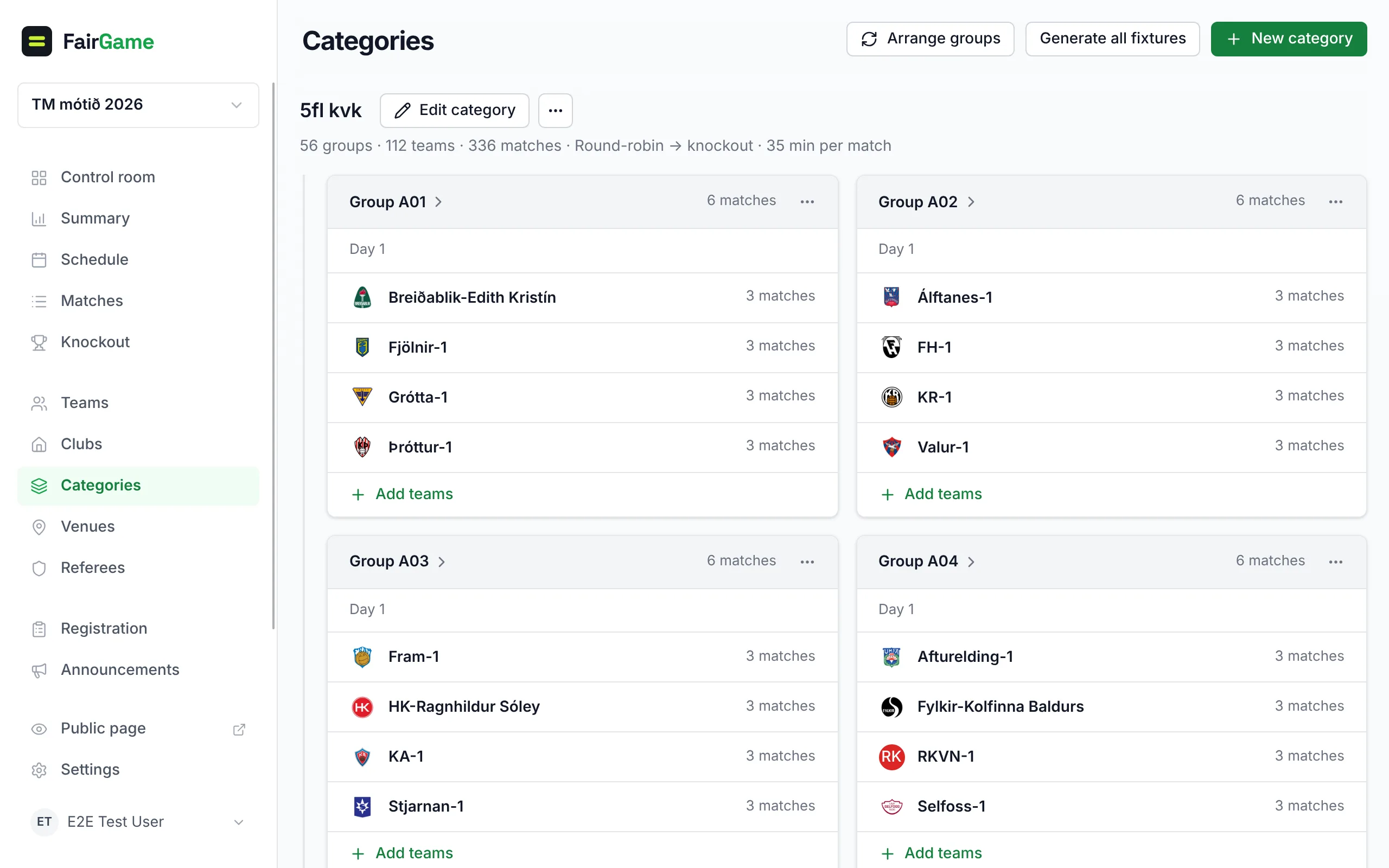
Manage → Categories shows every category with its groups, and every group with its teams; each category's groups sit indented under its name. Categories are listed alphabetically — 5.kk A, 5.kk B, 5.kk C — whatever order you added them in, and the setup wizard lists and creates them the same way. Category totals include all its groups; an empty group remains visible even if another group has the same name. The overview has no search field; the category selector used for ladder progression remains available.
Every name is a link: a category name opens the category's page, a group name its standings and matches, a team name the team. Everything you add, change or delete happens in place, without leaving the page:
- Edit category and the category's ··· menu sit right beside its name. The menu holds Open category, Organize groups and, last and in red, Delete category. A category with no groups yet also offers Add teams, which puts teams straight into the category. Delete category stays disabled, with the reason under it, until the category has no groups.
- New group, the last tile after a category's groups, adds a group to it, with the category already chosen and the next free name — Group C — filled in.
- Add teams at the foot of a group picks the teams to put in it: teams not in a group yet, and teams in the category's other groups to move over. To add a team that does not exist yet, type its name under New team — press Enter to list it and type the next one. The new teams are created straight in the group, in its category, so a group or Swiss pool can take a late entry even when every other team is already placed.
- The ··· menu on a group holds Open group, View matches, Add teams, Edit group and Delete group. View matches lists the group's matches in a panel on the same page; choose a match to open it. Deleting asks first, naming the group and what happens to its teams and matches.
Teams that belong to a category but sit in no group are listed under Not in a group yet: they play no matches until they are in a group. Add to group on each of them lists the category's groups. Deleting a group puts its teams there, so they stay in their category.
If you add a team to a round-robin group after fixtures exist, the next Auto-schedule run for that group’s day creates its missing matches before placing them. That fill-in run keeps existing scheduled and played matches in their slots, and the result reports how many fixtures it created. Generate fixtures only adds missing pairs; it never changes existing matches. From the Matches dialog, choose Fill in missing fixtures when the category already has fixtures. Swiss pools and knockout-only runs do not generate round-robin matches.
Categories
A category is a division with its own standings and its own bracket — Boys 2013, Women's open, Mixed recreational. Create one per division you would publish a separate table for.
Manage → Categories holds category setup, age bands and competition buckets. Open a category to reach its own page: the same group cards, Generate fixtures and New group at the top, and its ··· menu, where two actions reshape its groups:
- Split into groups divides a category that plays as one group. Choose the Number of groups — FairGame suggests one from the team count, aiming for about four teams per group — and the teams are spread by strength so every group gets a fair share of strong and weak teams. You can adjust the assignment before you confirm.
- Merge into one group puts every group in the category back together. Teams stay in the category, and you can split it again later.
To rename a group — Group A after a merge, for example — use Edit group in that group's ··· menu. To rename the category itself, use Edit category.
Split and merge only work before the category has fixtures; clear its matches first if it already has them. Both are common a week before the tournament, when registrations land differently than expected. None of these moves teams between categories. To combine two thin divisions, change each team's Category under Manage → Teams.
Generate fixtures on a category's page creates its round-robin matches, and Generate all fixtures at the top of Manage → Categories does every category in one pass. Categories with fewer than two teams are skipped, and so is a Swiss pool: its rounds are drawn from the pairing, not generated (see adaptive rounds), so a Swiss category's page has no Generate fixtures button, and the bulk run says before it starts how many Swiss categories it will leave alone. The results list says what happened to each category, and why.
A category with no groups plays as one group only while it is small enough for that — up to eight teams. Generating fixtures for such a category creates that one group itself, with every team in it, and the bulk confirm says so: 1 category has no groups yet: its teams play as one group, every team against every other. A larger category with no groups — the usual state after a roster import whose sheet had no group column — is not pooled: the bulk run skips it with No groups yet and names how many categories it left alone, and a category's own Generate fixtures refuses with No groups found for this category. Draw its groups first, on the Groups page, then generate.
When editing a category, Publish a standings table offers Use tournament default, Show standings, and Hide standings. This lets you hide a youth category while publishing another category in the same tournament, or show one category when the tournament default is hidden. Matches and internal standings remain available; only public tables and ranking summaries follow this setting. The mobile apps currently follow only the tournament-wide setting: while it is hidden they show no tables, even for a category set to Show standings.
Groups
A group is a round-robin pool inside a category. Four teams is the usual size: it gives every team three matches, produces a readable table, and keeps the match count manageable.
During setup, Teams & categories → Target teams per group lets you choose a different size for the tournament. Changing the number re-draws every category the wizard grouped for you straight away, so the split shown for each category — for example, 22 teams with a target of five form groups of 5, 5, 4, 4 and 4 — is what lands on the board. A category whose groups no longer have that shape — imported or arranged by hand, or left a group short by a removed team — reads as a preview instead, would become 5 groups … kept as arranged in 6 groups, and stays as it is until you select Re-draw with its name, which replaces it with the same split. When groups you arranged by hand would go, the re-draw asks you to confirm first; it cannot be undone. The review estimate follows the chosen size.
After groups are drawn, adding or removing a team keeps the other teams in place. A new team fills the emptiest group with room below the target; if every group is full, it stays visibly unassigned until you place it or choose the Re-draw action shown above the unassigned teams. Removing a team leaves the remaining groups intact. The split above the boards then says that category is kept as arranged and offers to re-draw it.
FairGame draws the groups for you, and team strength decides how. There are two ways to use it:
- By strength band puts teams of similar strength in the same group, so every match is close. This is what the guided setup does for the round-robin group formats — round-robin groups, and the group stage of groups then knockout — whenever the strengths you entered differ within a category; the category card says Groups are drawn with opponents of similar strength. The re-seeding ladders always draw this way, so teams reach even matches quickly.
- Balanced (serpentine) spreads strength evenly instead — the strongest teams land in different groups, so no group is a death group. Split into groups on a category's page draws this way, and so does applying one of the round-robin systems under Settings → Schedule & format → Tournament systems.
If every team has the same strength, or none was entered, there is nothing to seed from: teams are split evenly by count, and the setup says No differing strengths supplied: this draw is arbitrary, not seeded by strength.
The guided setup also keeps a club's teams apart. When its draw puts two teams from one club in the same group, it swaps one of them with a team of the same strength from another group — or one strength step away when no equal is free — so the strength bands hold. The club comes from your spreadsheet's club column or, before clubs are linked, from the team name: KR 2 counts as KR. A club with more teams than there are groups, or one with no fair swap, still shares a group; move those teams by hand if it matters.
Moving teams between groups
Each category's page has an Organize groups tab — the drag-and-drop view of group membership. Drag a team from one group to another, or use Move to a group on its card; teams in no group wait under Unassigned, and New group at the top of the page adds a column. This is a different board from Schedule in the sidebar, which places matches on pitches. For a team or two, Add teams on a group card does the same move without the board.
A team's fixtures belong to its group. Move a team that already has matches and those matches cannot survive — FairGame asks you to confirm before it deletes them. Regenerate the fixtures when you have finished moving teams, rather than after each move. The same holds for Edit team on a team's own page under Manage → Teams: only a team that has already played is locked there — use Withdraw team for it.
The safe order is: get the group membership right, then generate fixtures, then schedule. Doing it in that order means one regeneration instead of several.
Checking the draw
Tools → Fairness answers the question a coach will ask you on the Saturday: is this draw balanced? It shows team strength history, how even the groups are, and which teams look mis-rated — an entrant seeded far below the results it is actually producing.
Mis-rating is normal in youth tournaments where a club's B team is stronger than its A team. Catching it before the draw is published saves an argument; catching it afterwards at least tells you the argument is legitimate.
Reading a group
Open a group name on Categories to see its detailed standings and round structure. The page title reads Categories › 5.kk A › Group A: select the category to go back to its page. Add teams and Add match sit at the top, and the ··· menu holds Edit group and Delete group; deleting a group takes you back to its category, where its teams wait under Not in a group yet. The old Groups links remain available; there is no separate Groups item in the sidebar. Group names FairGame generated, such as Group A, read in the language you use the app in — Riðill A in Icelandic — wherever the group appears; a name you typed yourself is shown as written.
Open a group to add a one-off fixture to it: Add match asks only for the Home team and Away team, chosen from the group's own teams — the group and its category come from the page. The match is created unscheduled; open it to give it a time and a pitch. The button appears once the group has a category and at least two teams. If the two teams already meet in the group, the panel says how many times before you add another — a group of three often plays a return fixture.
In an adaptive Swiss pool, a kickoff whose teams are still to be drawn is listed as Teams drawn at 07:55, and each team's line counts the kickoffs it holds beside the matches already drawn — "2 matches · 4 kickoffs held".
For the ladder formats, Groups is also where each category moves on: select the category, then Advance to next day or Draw cup finals — see ladder formats.
For a Calibration round + groups tournament, selecting a category also shows How the groups were drawn: every team's registered strength beside what the calibration round measured — its group finish, record and rating — the rank that put it in its main-round group, and which teams, if any, were not carried into the main round. Before the draw it shows the projected groups, so it doubles as a check that the calibration results make sense.
Split into groups opens in the shared editor, with actions kept at the bottom. It keeps the strength-based snake preview, manual group choices and visible qualifier count; changing the group count resets manual choices. Changed drafts ask before closing, and editing or closing is blocked while the request is pending.
Category, group and team details use compact rows. Known teams show their club crest when available, with an initials fallback. Information buttons beside group section headings explain the roster, standings and matches; all standings columns and held kickoff counts remain available.