The match clock
A tournament day comes apart one court at a time. A referee runs long, the next kick-off slips, someone else waits for a team that is still in the car park, and by lunch the printed schedule is fiction.
The match clock is the answer to that: one clock for the whole tournament, not a timer per match. It runs a single repeating cadence —
|<-- match -->|<- changeover ->|<-- match -->|<- changeover ->| …
 round 1                        round 2
— and every court plays to it. When the countdown reaches zero the round is over, whether or not anyone has finished. Round 2 begins when round 1's changeover elapses. Nobody has to press anything for the day to keep moving, so a team that does not turn up costs its own match and not the afternoon.
Matches played in halves, periods or quarters get their breaks inside the match, and the clock runs those too — see periods.
Driving it
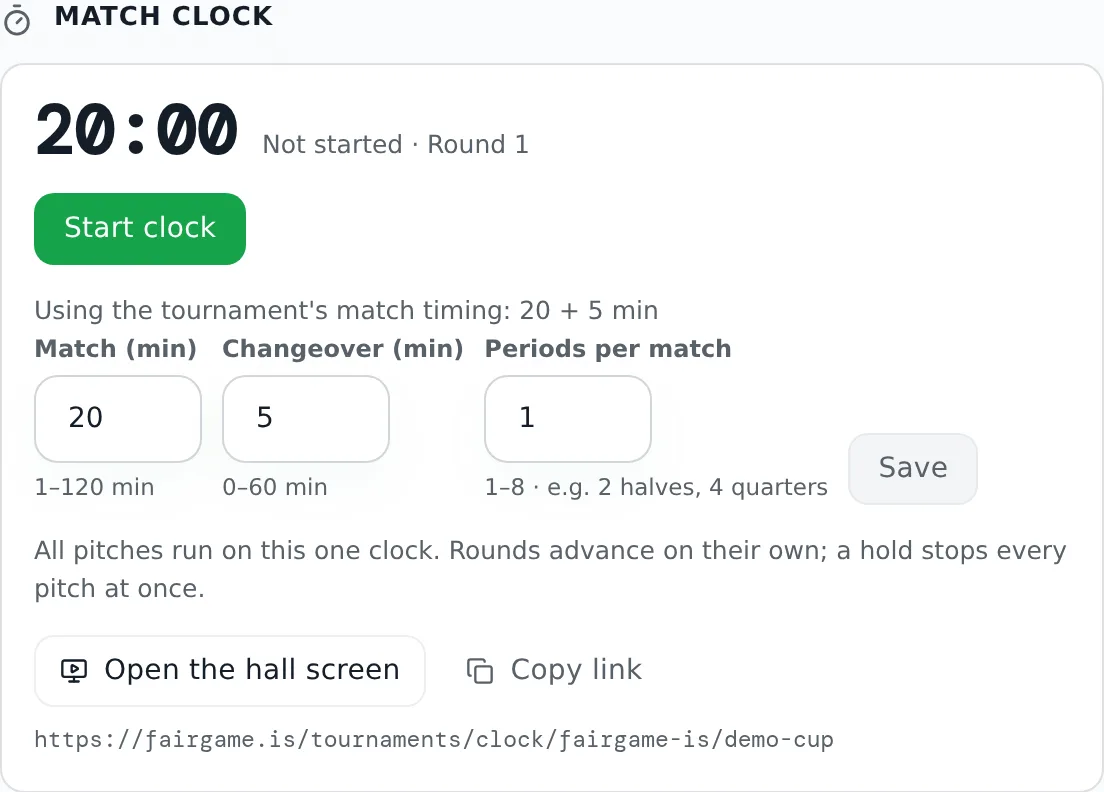
The Match clock panel is in the Control room, next to the board showing what each pitch is playing.
| Button | What it does |
|---|---|
| Start clock | Begins round 1 now. Only offered when the clock is not already counting, so you cannot throw the hall back to the start by accident. After a Stop on the same day it reads Start round 4 (or whichever round the hall stopped on) and carries on from there. |
| Pause | Holds the tournament. Every court freezes on the same digit. |
| Resume | Picks up where it stopped. The held time is given back, so the round still gets its full playing time — a pause delays the tournament, it does not shorten a match. |
| Next round | Ends the current round immediately and starts the next one. For when a round genuinely finished early. |
| Stop | Stops the clock and remembers the round it was on — for the lunch break, or the end of the day. |
| Reset | Sends the clock back to round 1. Offered after Stop, and asks first: Reset the clock? The hall goes back to round 1 and the day has to be started again. |
Only the buttons that make sense right now are shown, which matters more than it sounds at four o'clock on a Saturday.
Rounds keep advancing until someone stops the clock. Once every court has played its last fixture of the day, the panel says Past the last round of this day — stop the clock when play is over.
The cadence
Match and Changeover in whole minutes, Periods per match, and — once a match is split — its breaks, then Save.
A clock you have never set starts from the tournament's own timing: the match length most of your categories use, and the Break between matches under Settings → Schedule & format. Until you save or start the clock, the panel says where the numbers came from — Using the tournament's match timing: 20 + 5 min. Only a tournament with no categories yet falls back to 12 minutes of play.
Once you save or start the clock, it keeps its own numbers. If the tournament's playing time or break changes after that, the panel says the two disagree — The tournament plays 20 + 3 min, but this clock is set to 10 + 3 min. — and Use the tournament's timing fills the tournament's numbers into the fields for you to Save. Periods and breaks stay as you set them.
A match runs from 1 to 120 minutes. A changeover runs from 0 to 60 minutes — 0 is allowed, for a format that turns straight around. The range is written under each field, and a number outside it turns the field red and keeps Save disabled. If the clock itself turns a change down, the panel gives its reason after The clock rejected that:.
Changing the durations while the clock is running re-anchors it to the round it is on: the new lengths take effect from now, and the hall does not watch the countdown jump. What is already played stays played.
Periods
Leave Periods per match at 1 and each match is played straight through. Set it higher and the clock splits every match into that many periods, with a break after each one but the last. The break fields follow the count, and each one says underneath where its break falls:
- 2 — halves, with one break: the Halftime break.
- 3 — periods, as in ice hockey, with a Break between periods after the first and the second.
- 4 — quarters, as in basketball: a Break between periods after the first and the third quarter, and a Halftime break between the second and third, which you can set longer.
Any count from 1 to 8 works the same way: an even count has a halftime in the middle and period breaks everywhere else, and an odd count has period breaks only. Only the breaks on screen are saved: go from 4 periods to 2 and save, and the Break between periods is cleared — set it again if you go back to 4.
|<- Q1 ->|<- break ->|<- Q2 ->|<- halftime ->|<- Q3 ->|<- break ->|<- Q4 ->|<- changeover ->|
|<-------------------------------- match --------------------------------->|
The breaks come out of the match length, not on top of it, so the clock never drifts from the published kick-offs. A 30-minute match in four quarters, with 1-minute period breaks and a 4-minute halftime, is four 6-minute quarters, and every round still takes 35 minutes with a 5-minute changeover. Under the fields the panel writes one round out — Each round: 6 min · 1 min break · 6 min · 4 min halftime · 6 min · 1 min break · 6 min · 5 min changeover = 35 min — so you can see what the periods come to and read it back to the referees. To play full-length periods, the schedule has to make room for the breaks: give the categories that much more playing time before you schedule, and raise Match by the same amount. Two 10-minute halves with a 2-minute halftime need 22 minutes.
Each break runs from 0 to 30 minutes; 0 runs the periods back to back with only the whistle between them. Together the breaks have to leave at least a minute for each period — breaks that do not turn the Periods per match field red and keep Save disabled. Like the changeover, breaks run on their own: the next period starts when the break ends, and a Pause during a break holds it.
Changing the periods mid-match keeps the round ending when it would have; only where the periods fall inside it moves.
The hall screen
Open the hall screen at the bottom of the panel opens the public clock page — the one to cast to the projector or the television at the end of the hall. Copy link and the address itself sit beside it, because the machine driving the projector is rarely the one you are sitting at. It is a public link, so any device can open it without signing in, and it is deliberately kept out of search engines.
The hall screen belongs to the public site, so it only shows the clock once the tournament is published. Until then the panel still offers the link and Copy link, under the note Publish this tournament to use the hall screen., so you can set up the projector before you publish. A screen opened early reads This tournament isn't public yet — it keeps checking and fills in by itself once you publish.
The screen shows the countdown, the round number, and every court with the match on it now and the one up next. Above the countdown it says what is happening: Playing for a match played straight through; First half and Second half for two periods, Quarter 1 to Quarter 4 for four, and Period 1, Period 2 and so on for any other count; Halftime or Break between them; then Changeover. During the changeover, and as soon as the current match has a result, the card leads with Up next — the team that has to take the court is the one said loudest. A break between periods is not a handover, so the match being played keeps the lead through it. A finished match is marked Full time with its score.
When there are more courts than fit at a readable size, the board shows at most 12 at a time and turns the page every ten seconds, marked Courts 1 of 2. After the last round of the day it reads That's the day — thanks.
Two controls sit at the bottom, for while you are putting it up:
- Full screen — fills the display.
- Whistle on / off — a long blast when play starts, two short ones when it ends. With periods that goes for each period: two short ones at every break, and a long blast when the next period starts; a 0-minute break or changeover gives both, back to back. Start clock and Next round get their kick-off whistle too. Browsers only allow sound after someone clicks, so switching the whistle on is also the click that lets it play at all — the screen answers with a short pip, so you can check the volume and that it comes out of the hall's speakers rather than the laptop's. A screen switched on mid-match stays quiet until the next transition rather than announcing a kick-off that already happened. Once the last match of the day has ended the whistle stays quiet, even while the clock keeps running.
The screen remembers that the whistle was on. If the browser stops the sound — after a reload, after the laptop has slept, or when another program takes over the speakers — the button turns red and reads Whistle blocked — tap to turn it on; one tap anywhere on the screen brings it back. A browser that cannot play sound at all says No whistle in this browser. While the clock page is in front, the screen is also kept from dimming or going to sleep, in browsers that allow it.
Every screen derives its countdown from the server's clock rather than its own, so a television that is four minutes out still agrees with the organizer's laptop, every screen in the hall whistles at the same moment, and a pause reaches the hall within a second or two. A pause pressed in the last second or two before a whistle can arrive after it; that whistle then sounds again at the right moment after Resume.
What each court is playing
Round N is the Nth fixture on that court, in scheduled order — not the kick-off time printed on the fixture. That is the whole point of a shared clock: when round 3 starts, every court starts its third match, so a court that overran earlier is back in step instead of dragging everything behind it.
Courts with no fixtures that day do not appear. A court that has run out of matches shows as free.
The board fills from the published schedule, so it stays empty until you have published the day.
Which day it runs
The clock is anchored to one tournament day, and the panel names it beside the round. Starting it uses today when today is a tournament day, and the opening day otherwise, so a three-day cup starts each morning at round 1 instead of counting round 47 on the Sunday — even if Saturday ended on Stop rather than Reset.
What it does not do
The clock is a cadence, not a referee and not a scoreboard.
- It does not start, stop or complete matches. Match status and scores are entered exactly as before.
- It does not change the published schedule or any kick-off time.
- It has no effect on standings, brackets or advancement.
Coaches will time their warm-ups off the screen within twenty minutes of it going up. Setting the match and changeover lengths once, before round 1, is worth more than any adjustment you make later — every change mid-day is a hall full of people recalculating.
See also running the tournament day and publishing the schedule.